Stakeholder Approval Process Video: A Project Manager's Guide
August 14, 2026 · Video Production Company

Getting stakeholder approvals on time is one of the most persistent pressure points in project management. Miscommunication, unclear roles, and scattered feedback create delays that push deadlines back and strain relationships. A well-structured stakeholder approval process video changes that dynamic. It gives your stakeholders a clear, consistent explanation of what they are reviewing, what decisions they need to make, and by when. This guide walks you through the planning, production, feedback management, and verification steps that project managers need to build a reliable, video-based approval workflow.
Table of Contents
- Key takeaways
- Prerequisites for your stakeholder approval process video
- How to create the approval process video step by step
- Managing feedback and revisions efficiently
- Verifying approval and taking next steps
- My perspective on what actually changes when you use video
- How Kickervideo supports your approval workflow
- FAQ
Key takeaways
| Point | Details |
|---|---|
| Plan before you record | Map stakeholders by power and interest before scripting your video to align the workflow with actual decision rights. |
| Separate review from approval | Treat review as iterative feedback and approval as formal sign-off to prevent scope creep and circular revisions. |
| Centralize all feedback | Use time-stamped comments in a dedicated platform to reduce email threads and speed up revision cycles. |
| Automate reminders and gates | Set deadlines and automated notifications so approvals cannot stall due to late responses or missed checkpoints. |
| Document every sign-off | Record approval history formally to support compliance, accountability, and future project audits. |
Prerequisites for your stakeholder approval process video
Before you open any recording software, you need a clear picture of who is involved, what they need to know, and how decisions flow through your organization. Skipping this step is the most common reason approval videos fail to move projects forward.
Identify your stakeholders and their roles
Mapping stakeholders by power and interest is the starting point for any effective approval workflow. Not every stakeholder carries the same decision authority, and your video should reflect that. A senior director who signs final budgets needs different information than a subject matter expert who reviews technical accuracy.
Create a simple matrix that lists each stakeholder, their role in the approval, and whether they are a reviewer, a required approver, or a consulted party. This prevents the common mistake of routing approvals to people who cannot actually authorize them, which wastes time for everyone.
Effective stakeholder engagement requires tailoring your communication strategy by group, from simply informing some parties to building genuine partnership with core decision makers. Your video should reflect those differences in tone, detail, and call to action.
Define your video objectives and key messages
Write down exactly what you need each stakeholder to do after watching the video. That action determines the content. If you want a department head to approve a budget line, your video must explain the cost rationale clearly, not just show project timelines. Keep each video focused on a single decision or approval stage rather than trying to cover everything at once.
Choose the right tools and map your workflow
Select a video review platform that offers frame-accurate comments, version tracking, and formal approval stages. These features are not optional. They are what separates a structured approval workflow from an email chain that trails off without resolution.
Map out your approval workflow before recording:
- Define how many review rounds are permitted before a final approval request
- Set deadlines for each stage and communicate them upfront
- Decide whether reviewers will work in parallel or in sequence
- Assign a single point of contact for consolidating conflicting feedback
- Prepare scripts and supporting materials tailored to each stakeholder group
Pro Tip: Script your video so the first 30 seconds state exactly what the stakeholder is being asked to approve, the relevant deadline, and where they submit their response. Stakeholders who know what is expected from the start are far more likely to respond on time.
How to create the approval process video step by step
With your planning done, you are ready to produce. The goal is a video that is clear, concise, and easy to act on. This is not the place for cinematic production. Your stakeholders need information, not entertainment.
-
Write a structured script. Open with the decision required, provide the context needed to make that decision, and close with a direct call to action including the deadline. Use plain language. Avoid internal acronyms unless every viewer already knows them.
-
Keep each video under five minutes. Longer videos lose attention and delay responses. If you need to cover multiple approvals, create separate videos for each. Stakeholders respond faster when they know exactly which decision is in front of them.
-
Record with a clean, professional setup. Screen recordings with voiceover work well for process walkthroughs. On-camera recordings add authority for high-stakes approvals. Make sure audio quality is high. Poor audio is the single fastest way to lose a stakeholder’s confidence in your content.
-
Add annotations and timestamps. Mark the sections of your video that correspond to specific review points. This makes it easy for stakeholders to jump to the part that concerns them, rather than watching from start to finish. Centralizing video feedback in dedicated platforms with precise annotations reduces email clutter and accelerates review cycles significantly.
-
Build in version tracking. Name your files clearly with version numbers and dates. When you upload a revised version, your review platform should allow side-by-side comparison so stakeholders can see exactly what changed. This prevents the frustrating experience of re-reviewing content that did not change.
-
Set automated reminders and deadlines. Automated reminders within video review tools keep stakeholders on schedule and reduce bottlenecks caused by late responses. Configure these before you send the video out, not after the first deadline passes.
-
Test the viewer experience. Watch the video yourself through the review platform as if you were the stakeholder. Confirm that the comment function works, the approval button is visible, and the instructions are clear.
Pro Tip: Record a short 60-second companion video that shows stakeholders exactly how to use the review platform if they are new to it. A one-time tutorial eliminates the “I didn’t know how to respond” excuse and speeds up your first approval round considerably.
Managing feedback and revisions efficiently
Collecting feedback is where most approval workflows break down. Without structure, you end up with comments scattered across email, chat, and meetings, each stakeholder operating on a different version of the video.

Centralize all comments in one place
A formal video review and approval workflow uses time-stamped, frame-accurate comments within the platform rather than external communication channels. When every comment lives in the same place, you can act on feedback faster and maintain a clear record of what was requested and when.
Know the difference between review and approval
This distinction matters more than most project managers realize. Review is the iterative feedback process on drafts. Approval is formal sign-off confirming the final version is ready. Treating them as the same thing leads to endless revision cycles where stakeholders keep adding new comments after approval was supposed to occur.
Set a fixed number of review rounds in advance, communicate that number to all stakeholders, and hold the line.
Resolving conflicting feedback
When two stakeholders contradict each other, do not try to satisfy both simultaneously. Refer back to your stakeholder map. The person with higher decision authority on that specific point takes precedence. Document the decision and notify both parties. Stakeholder obstacles are largely structural, not personal, and a clear process for resolving conflicts removes the ambiguity that causes delays.
Review round comparison
| Stage | Purpose | Who participates | Output |
|---|---|---|---|
| Round 1 review | Initial feedback on content accuracy | Subject matter experts | List of required changes |
| Round 2 review | Confirmation of revisions | Original reviewers | Approval to proceed to sign-off |
| Final approval | Formal authorization to distribute | Decision-making stakeholders | Signed approval record |
| Post-approval archive | Documentation and compliance | Project manager | Stored file with approval history |
Verifying approval and taking next steps
Getting a verbal “looks good” is not approval. It is an opinion. You need formal confirmation tied to a specific version of the video before moving forward.
Use formal sign-off markers
Your review platform should include a distinct approval button or stage that stakeholders click to confirm their formal acceptance. Approval gates need to be hardcoded into your workflow so the process cannot advance without them. Soft enforcement, where approval is assumed from silence or a casual message, creates compliance risk and erodes accountability.
Communicate approval status to the team
Once you have formal sign-off, notify your full project team immediately. Real-time dashboards that display approval status improve transparency and reduce redundant follow-up questions. Even a simple status update in your project management tool accomplishes this. Everyone on the team should know when an approval is complete without having to ask.
Document and archive the approved video
| Documentation element | What to record | Why it matters |
|---|---|---|
| Approved version number | File name and timestamp of final version | Prevents confusion if older drafts resurface |
| Approver names and roles | Who gave formal sign-off | Required for compliance and audit trails |
| Approval date | Exact date of final sign-off | Establishes project timeline benchmarks |
| Scope of approval | What was authorized, and any noted conditions | Protects against scope creep disputes later |
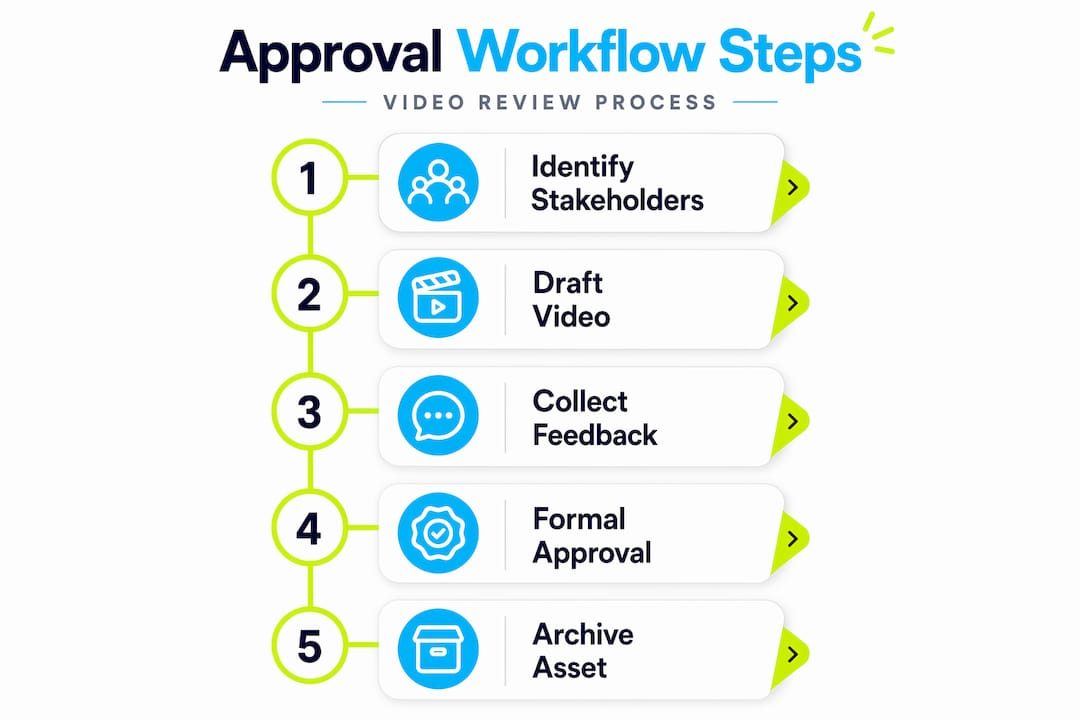
Archiving approved videos also creates a reusable asset. Future projects with similar approval requirements can reference the same format, saving significant preparation time. For guidance on corporate video compliance, including documentation requirements for regulated industries, the stakes for getting this right are even higher.
My perspective on what actually changes when you use video
I’ve worked in B2B video production for 18 years, and the pattern I see repeatedly is this: project managers invest significant effort in the creative work and almost none in structuring how that work gets approved. Then they wonder why projects stall.
The teams that move fastest are not the ones with the most sophisticated platforms. They are the ones that separate review from approval as a formal practice, not just a theoretical concept. I’ve seen projects with simple screen recordings and a basic review tool outperform teams using expensive tools because the simpler team had a clear process and held to it.
What I’ve learned is that consulting stakeholders early and often prevents the most expensive delays. Not just notifying them. Actually involving them in defining what the approval criteria look like before the first draft exists. When stakeholders help set the standard, they approve against it rather than inventing new standards mid-review.
The other thing I’d push back on is the assumption that more stakeholder touchpoints mean more alignment. They don’t. Three well-structured interactions tied to clear decisions outperform ten casual check-ins every time. Video makes that possible because you control the message, the format, and the call to action in a way that a meeting or email never can.
For project managers who want to improve stakeholder engagement through video, the mindset shift is to treat the approval video as a decision-support tool, not just a deliverable to share.
— Kicker
How Kickervideo supports your approval workflow
At Kickervideo, we have spent 18 years helping B2B teams produce videos that do more than look good. They move projects forward.
When your stakeholder approval process needs a professional foundation, our production team builds the video assets and workflow structure that support faster consensus and cleaner sign-offs. From scripted approval walkthroughs to version-controlled review packages, we handle the production so your team can focus on the decisions that matter. Explore our B2B video production workflow built specifically for marketing and project teams who need approval-ready video at every stage of a project. You can also review why video drives B2B results if you are building a business case for your team.
FAQ
What is a stakeholder approval process video?
A stakeholder approval process video is a structured recording that walks stakeholders through what they are reviewing, what decision they need to make, and how to formally submit their approval. It replaces or supplements email-based approval requests with a clear, consistent format that reduces miscommunication.
How many review rounds should a video go through before approval?
Most projects work well with two structured review rounds before a final approval stage. Communicating this limit upfront prevents endless revisions and keeps the approval workflow on track.
What tools do you need for a video approval workflow?
You need a video hosting and review platform that supports time-stamped comments, version comparison, automated reminders, and a formal approval button. These features are what separate a structured workflow from an unstructured email chain.
How do you prevent stakeholders from bypassing the approval gate?
Hardcode approval gates into your workflow using platform-enforced logic rather than relying on honor systems. This ensures the project cannot advance without explicit sign-off from the required stakeholders.
How should you handle conflicting feedback from multiple stakeholders?
Refer to your stakeholder map and give precedence to the person with the highest decision authority on the specific issue. Document the resolution and communicate it to all parties to maintain transparency and prevent the same conflict from resurfacing in the next review round.