
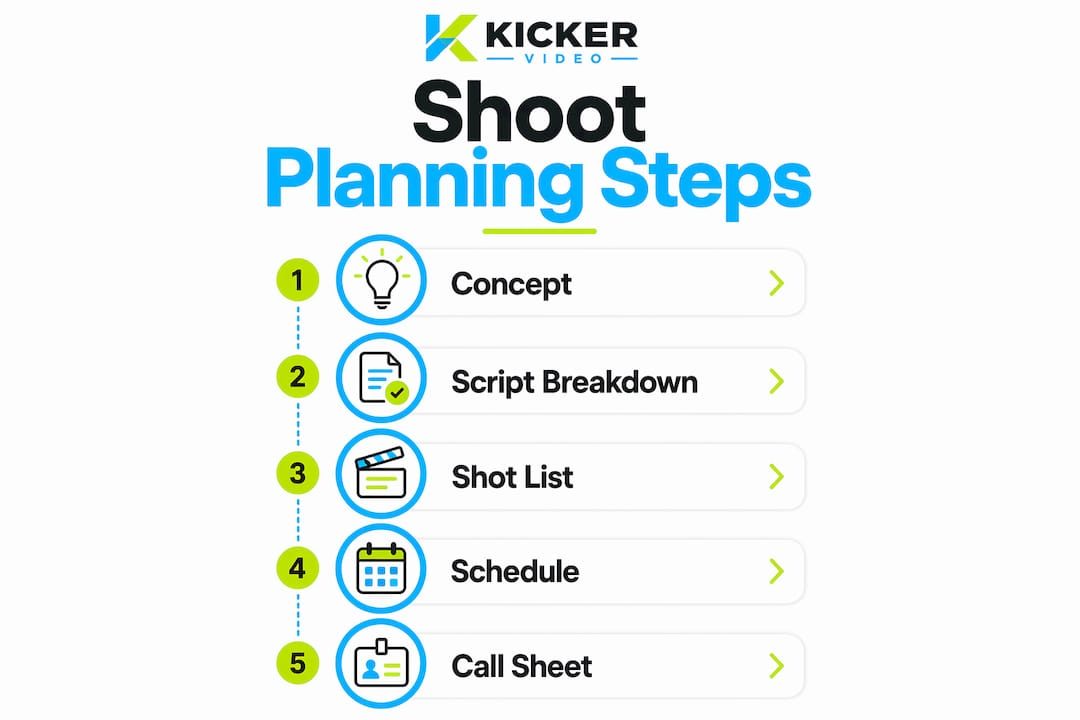
Step by step shoot planning is the systematic process of organizing every element of a video production — concept, script breakdown, shot list, schedule, and call sheets — into a logical sequence that protects your budget and creative vision. Without this structure, even well-funded productions lose hours to avoidable confusion on set. The industry standard for professional pre-production now integrates tools like StudioBinder, Saturation.io, and AI-assisted shot list generators to compress planning timelines while maintaining precision. This guide walks you through each phase in the order professionals use it, with specific techniques and pro tips drawn from current production workflows.
How to develop your shoot concept and pre-production brief

Every successful production begins with a clearly defined concept. Before you touch a camera or write a single shot, you need to establish what the video is for, who it is for, and what it must communicate. This is not a creative exercise. It is a production decision that shapes every downstream choice, from locations to crew size.
Start by documenting your objectives in a pre-production brief. This brief should answer four questions: What is the deliverable? Who is the audience? What is the key message? What format and length are required? Once those answers are locked, you can build a moodboard using a tool like Milanote, which lets you collect visual references, color palettes, and tone examples in a shared workspace your client or stakeholders can review before production begins.
If you have a script or storyboard at this stage, attach it to the brief. If you do not, use the brief to commission one. The brief also defines your deliverables, whether that is a 90-second brand film, a series of social clips, or a product demo. Aligning on deliverables before pre-production begins prevents scope creep later.
- Define the shoot’s objective and key message in writing
- Identify the audience and the emotional response you want to create
- Build a moodboard with visual references using Milanote or a shared Google Slides deck
- List all deliverables with format, length, and platform specifications
- Attach or commission a script or storyboard before moving to breakdown
Pro Tip: Get written sign-off from your client or internal stakeholder on the concept brief before moving to script breakdown. One round of revisions at this stage costs hours. One round of revisions after you have built a full shot list costs days.
What does a script breakdown involve?
A script breakdown is the process of reading through your script and identifying every production element it requires: locations, cast members, props, wardrobe, special equipment, visual effects, and stunts. This is the foundation of your video production process, and skipping it is the single most common cause of lost shots on set.
The standard approach is to work scene by scene, color-coding each element category on a printed or digital script. Cast members get one color, props another, locations another. Software like StudioBinder automates this process by letting you tag elements directly in the script and auto-populate breakdown sheets. Each breakdown sheet corresponds to one scene and lists every element required to shoot it.
Once your breakdown sheets are complete, you can build your shot list. A shot list should include at minimum seven core columns: Scene, Shot ID, framing, angle, movement, action, and duration. These columns prevent mid-shoot confusion and give your technical teams the preparation time they need. Missing even one column forces on-set decisions that disrupt shooting flow.
Here is how to build a shot list from your breakdown:
- Pull every scene from your breakdown sheets and assign a scene number
- For each scene, list every shot required with a unique Shot ID
- Specify framing (wide, medium, close-up), angle (eye level, low, high), and camera movement (static, pan, dolly)
- Write a brief action description for each shot
- Estimate duration in seconds to help with scheduling
- Mark each shot as either “must-have” or “nice-to-have” to guide on-set prioritization
AI-assisted shot list generation compresses this process from days to hours by automatically extracting scenes and suggesting typical shot coverage. Your DP and director then refine the output rather than building from scratch. This is now standard practice on productions with tight pre-production windows.
Pro Tip: Mark every shot as either “must-have” or “nice-to-have” before you arrive on set. When time runs short, your crew knows exactly which shots to protect and which to cut without a conversation.
Shot list column comparison
| Column | Purpose | Consequence if missing |
|---|---|---|
| Scene number | Links shot to script and schedule | Crew cannot cross-reference documents |
| Shot ID | Unique identifier for editing and continuity | Confusion in post-production logging |
| Framing | Defines lens choice and composition | Camera department arrives unprepared |
| Angle | Sets camera position relative to subject | Lighting and grip setups are incorrect |
| Movement | Specifies rig requirements | Wrong equipment arrives on set |
| Duration | Informs scheduling and pacing | Schedule overruns on individual shots |
| Action description | Guides performance and camera timing | Director and DP are not aligned |
How do you build an efficient shooting schedule?
A shooting schedule organizes your shoot days by production logic, not story order. Scheduling by production logic minimizes company moves, maximizes daylight shooting, accounts for actor availability, and keeps overtime costs down. Scheduling by story chronology does the opposite, and it is one of the most expensive mistakes a production can make.
The biggest mindset shift in scheduling is understanding that your audience will never see the order in which you shot. They will only see the edit. That means you can shoot the final scene of your video on day one if it makes logistical sense to do so.
Here is the step by step process for building a shooting schedule:
- Group all scenes by location. Scenes shot at the same location should be scheduled on the same day or consecutive days to eliminate redundant company moves.
- Within each location group, sort scenes by time of day. Exterior scenes requiring daylight go first. Interior scenes or those requiring artificial light can fill the afternoon or evening.
- Check cast availability against your grouped scenes. Use a Day-Out-of-Days (DOOD) report to map which cast members are needed on which days.
- Apply stripboard logic. A stripboard is a visual grid where each strip represents one scene. Arrange strips to build the most efficient shooting day possible.
- Assign a one-liner to each shooting day. A one-liner is a single-sentence summary of each scene, giving the full crew a quick reference for what is being shot.
- Build in buffer time. Assume setups will take longer than planned, especially on location.
Scheduling protects turnaround times between shoot days to maintain crew wellbeing and prevent delays from cascading through the production. Under union contracts, minimum turnaround is typically 10 to 12 hours. Non-union productions should apply the same standard to protect crew performance and avoid burnout.
Pro Tip: Build your shooting days to 85% capacity, not 100%. The 15% buffer absorbs the unexpected without pushing your crew into overtime or forcing you to drop shots.
Sample one-day schedule structure
| Time block | Activity | Notes |
|---|---|---|
| 7:00 AM | Crew call and setup | Grip, electric, and art department first |
| 8:00 AM | Camera ready | DP confirms lighting and framing |
| 8:30 AM | First shot | Must-have shots scheduled first |
| 12:30 PM | Lunch | Hard stop, 30 minutes minimum |
| 1:00 PM | Afternoon block | Location move if required |
| 5:30 PM | Wrap | Protect turnaround time |
What goes into a professional call sheet?
A call sheet is the daily communication document that synthesizes your schedule, location details, cast and crew contacts, and safety information into a single reference every department receives before the shoot day begins. It is the final output of your shoot planning checklist, and it is what separates organized productions from chaotic ones.
A professional call sheet includes header information such as production studio name, shoot date, general call time, detailed location information including parking instructions and the nearest hospital, a shooting schedule with setup and breakdown times, cast and crew lists with individual call times, department-specific notes, and private messages for individual recipients.
The safety information on a call sheet is not optional. Call sheets include emergency contact and nearest hospital information to support rapid response if an incident occurs on set. This is standard practice across union and non-union productions.
Key elements to include in every call sheet:
- Production name, shoot date, and general call time in the header
- Full location address with parking details and nearest hospital
- Scene-by-scene shooting schedule with estimated setup and breakdown times
- Cast list with individual call times and character names
- Crew list organized by department with contact numbers
- Department notes for art, camera, grip, electric, and sound
- Weather forecast if shooting exteriors
- Emergency contacts and safety officer information
Distributing call sheets at least 12 hours before the shoot start time is standard professional practice. It gives cast and crew adequate preparation time and reduces the volume of questions you receive on the morning of the shoot. Tools like StudioBinder let you send call sheets digitally, track who has opened them, and push last-minute updates to the full team.
Pro Tip: Use the private message field in your call sheet to send department-specific instructions or sensitive information. It keeps your main document clean and your communication targeted.
Common shoot planning mistakes and how to avoid them
Poor planning does not announce itself in pre-production. It shows up as a missed shot at 4 PM when the light is gone, or a location that was never confirmed, or a crew member who did not know they were needed until the morning of the shoot. Scheduling by story chronology rather than production logic often leads to excessive location moves, crew overtime, and actor hold days that inflate your budget without adding a single frame of value.
The most common planning failures are predictable and preventable:
- Skipping the script breakdown and going straight to scheduling, which causes locations, props, and cast to be missed
- Building a shot list without all seven core columns, forcing on-set decisions that slow down the entire crew
- Sending call sheets the morning of the shoot instead of the night before, leaving cast and crew unprepared
- Ignoring turnaround time between shoot days, which compounds into crew fatigue and performance issues by day three
- Failing to involve department heads in the scheduling process, which produces a schedule that looks good on paper but does not work in practice
Detailed shot lists with priority markings help on-set teams allocate resources and adapt to schedule changes without losing momentum. Scheduling software that integrates with your shot list and call sheets automates updates across documents, reducing manual errors and keeping your entire team aligned in real time.
Pro Tip: Share your draft schedule with your DP, AD, and location manager before locking it. They will catch conflicts you cannot see from the producer’s chair.
Key takeaways
Effective shoot planning requires a sequential workflow where each step, from concept brief to call sheet, builds directly on the one before it.
| Point | Details |
|---|---|
| Start with a concept brief | Lock your objectives, deliverables, and stakeholder sign-off before touching a script. |
| Build a complete script breakdown | Tag every location, cast member, prop, and equipment need before creating your shot list. |
| Use seven core shot list columns | Scene, Shot ID, framing, angle, movement, action, and duration prevent on-set confusion. |
| Schedule by production logic | Group scenes by location and time of day to minimize moves and protect your budget. |
| Distribute call sheets 12 hours early | Give cast and crew adequate preparation time and track delivery with digital tools. |
What 18 years of shoot planning has taught me
After nearly two decades producing B2B video at Kickervideo, the pattern I see most often is not a lack of talent. It is a lack of sequence. Productions that struggle are almost always ones where the team jumped from a creative idea directly to a shoot day without building the infrastructure in between.
The shift to AI-assisted shot list generation has been genuinely useful. What used to take a skilled AD two full days now takes a few hours, with the creative team spending their time refining rather than generating. That is a real productivity gain, and productions that have not adopted it yet are leaving time on the table.
What I have not seen change is the value of a well-built call sheet. It is still the document that determines whether your crew arrives confident or confused. The productions that run smoothly are the ones where every person on set knew exactly where to be, what to bring, and who to call if something went wrong, before the day started.
The filmmakers who adopt systematic planning workflows early in their careers build a reputation for being easy to work with. That reputation compounds over time. Clients come back, crews ask to be rehired, and productions get more ambitious because the team trusts the process.
— Kicker
How Kickervideo supports your production workflow
Kickervideo has spent 18 years building B2B video production workflows that take marketing teams from concept brief to final delivery without the chaos that comes from improvised planning. If you are managing video shoots for a brand or agency and want a production partner who brings a structured process to every project, Kickervideo’s workflow is built for exactly that. From script breakdown to call sheet distribution, the team handles the planning infrastructure so your creative energy goes into the work. Explore how a professional production workflow can protect your timeline and budget on your next shoot.
FAQ
What is step by step shoot planning?
Step by step shoot planning is the process of organizing all video production elements in a sequential order, covering concept development, script breakdown, shot list creation, shooting schedule, and call sheet distribution. Each step builds on the previous one to protect your budget and creative goals.
How many columns should a shot list have?
A shot list should include at minimum seven core columns: Scene, Shot ID, framing, angle, movement, action, and duration. Missing any of these forces on-set decisions that slow down the crew and disrupt shooting flow.
When should call sheets be distributed?
Call sheets should be distributed at least 12 hours before the shoot start time. This gives cast and crew adequate preparation time and reduces last-minute questions on the morning of the shoot.
What is production logic scheduling?
Production logic scheduling organizes shoot days by location, time of day, and cast availability rather than story order. This approach minimizes company moves, reduces overtime, and keeps production costs under control.
What tools help with shoot planning?
StudioBinder handles script breakdowns, shot lists, and call sheets in one platform. Saturation.io specializes in shooting schedules and stripboard planning. AI tools like M Studio accelerate shot list generation from days to hours while retaining director and DP control over the final output.