What Is Video Content Archiving for Creators and Marketers
August 17, 2026 · Video Production Company

Most content creators and digital marketers assume video archiving means copying files to a hard drive and calling it done. It does not. What is video content archiving, really? It is a structured system that layers metadata, permissions, version tracking, and retrieval workflows on top of simple storage, so you can actually find, verify, and reuse your content years from now. This article covers the technical foundations, the right formats, the full archiving lifecycle, and the practical benefits that make digital video archiving worth building correctly from day one.
Table of Contents
- Key takeaways
- What video content archiving actually means
- Preservation formats and storage strategies
- The video archiving lifecycle and metadata’s role
- Practical benefits of effective video content archiving
- What I’ve learned from 18 years of watching archives succeed and fail
- How professional video production supports better archiving
- FAQ
Key takeaways
| Point | Details |
|---|---|
| Archiving is not just storage | Video archiving adds metadata, permissions, and workflows that make content findable and reusable long-term. |
| Format choice matters | Preservation formats like AVI and MOV protect quality, while MP4 handles broad accessibility for operational use. |
| Metadata drives retrieval | Well-structured metadata lets you search, automate, and manage rights without re-encoding files. |
| Lifecycle never ends | Archives require ongoing validation, documentation, and format migration. There is no set-and-forget approach. |
| Archiving saves real money | Tiered storage and policy-driven automation cut costs while keeping your most valuable content accessible. |
What video content archiving actually means
Video archiving goes beyond storage by improving long-term accessibility and management to help teams find, verify rights, and reuse content. That distinction matters more than most people realize. A folder of MP4 files with no structure is not an archive. It is a pile.
A true archive organizes video assets around several core components:
- Metadata: Descriptive tags covering title, date, subject, keywords, creator, and technical specs. Without these, retrieving a specific clip from thousands of hours of footage becomes a manual search through files.
- Permissions and rights information: Who owns the content, what licenses apply, and where it can be used. This protects you legally and prevents costly mistakes when repurposing content.
- Versions and variants: Raw footage, edited cuts, color-graded masters, social media exports. A proper archive tracks all of them, so you know which version serves which purpose.
- Retrieval workflows: How content is requested, accessed, and delivered. Without clear workflows, even a well-tagged archive becomes a bottleneck.
The types of video that organizations archive are broader than most people assume. Raw production footage, finished broadcast content, surveillance recordings, corporate training materials, live event recordings, and marketing assets all belong in a managed system. Each type carries different retention needs, rights considerations, and access requirements.
The practical difference between archiving and storage is searchability and governance. Storage answers the question “Do we have this file?” Archiving answers “Can we find it, use it, and prove we have the right to?”
Pro Tip: Start tagging metadata at the point of production, not after. Retroactively adding metadata to hundreds of hours of footage is expensive and error-prone. Building it into your production workflow saves significant time down the road.
Preservation formats and storage strategies
Not every video format is created equal, and format choice involves balancing preservation quality against file size and accessibility needs. Getting this wrong costs you either storage budget or file quality.
Here is a practical comparison of common archiving formats:
| Format | Best use case | File size | Quality preservation |
|---|---|---|---|
| AVI | Preservation master | Large | High |
| MOV | Preservation master | Large | High |
| MP4 / H.264 | Operational proxy, distribution | Small | Good (compressed) |
| ProRes | High-quality editing proxy | Medium-large | Very high |
| MXF | Broadcast and institutional archives | Variable | High |
The smart approach separates preservation masters from operational proxies. Your archive keeps the AVI or MOV master at full quality. Editors and marketers work from compressed MP4 proxies. This way you maintain archival integrity while keeping day-to-day workflows fast and practical. The BFI’s Digital Preservation Infrastructure manages 20 petabytes using exactly this parallel stream approach, and it applies to any organization serious about long-term preservation.

Storage tiering is the cost management side of this equation. Tiered storage keeps video at high quality briefly, then archives older content to lower frame rates or cheaper drives for longer retention. Your most recently accessed content stays on fast, on-premises drives. Older footage moves to lower-cost cloud storage. Content you rarely need goes to cold storage or tape.
A hybrid model combining on-premises drives, edge storage, and cloud integration gives you the most flexibility. For guidance on deciding between these approaches, Kickervideo’s breakdown of cloud vs. local storage for video projects is worth reviewing before you commit to a single infrastructure path.
Pro Tip: Never rely on a single storage location for preservation masters. The 3-2-1 rule applies here: three copies, on two different media types, with one stored offsite or in the cloud.
The video archiving lifecycle and metadata’s role
Long-term video archiving demands ongoing quality control, documentation, storage management, and data migrations. There is no point at which you finish and walk away. Understanding the full lifecycle helps you design a system that holds up over time rather than quietly decaying.
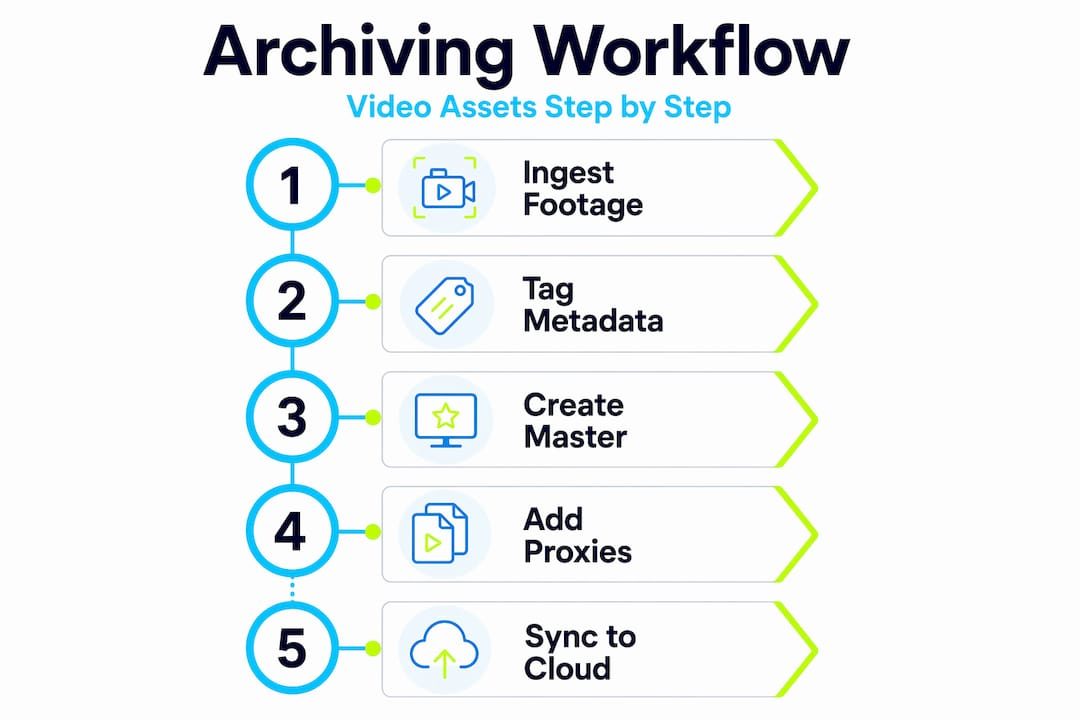
The lifecycle of a properly archived video asset moves through these phases:
- Acquisition or digitization: Video enters the archive, whether captured fresh from production or digitized from older physical formats. This is when baseline quality checks happen.
- Validation: Technical verification that the file is complete, uncorrupted, and meets your archive’s format requirements.
- Documentation: Metadata is assigned or confirmed. This includes descriptive metadata (what the video is about), technical metadata (codec, resolution, frame rate), and rights metadata (ownership, licenses, usage restrictions).
- Storage: The master file moves to its designated preservation location, and an access copy or proxy is generated for operational use.
- Access and retrieval: Users request content through defined workflows. Metadata stored separately from video allows fast, policy-driven retrieval and storage automation without needing to re-transcode video.
- Migration: As formats become obsolete, preservation masters are migrated to current standards. This is not optional. It is how archives survive format changes.
Preservation metadata is especially important at every stage. Preservation metadata includes detailed audit events describing digital preservation lifecycle actions, which supports clear provenance and compliance. Think of it as a chain of custody record for your video.
One challenge that catches organizations off guard is metadata drift. Over time, metadata can become inconsistent with the actual properties of the media files. Large archives use automated probing to keep metadata in sync with media, preventing errors in search and editorial use. If you are managing a growing library, building verification checks into your regular workflow is not optional.
“Preservation metadata records lifecycle events and processes tied to video, supporting provenance and future migration decisions.” — NLN Digital Preservation
For content creators managing footage in tools like Adobe Premiere Pro, organizing your project with consistent metadata from the start is the foundation of an archive that works. Kickervideo’s guide on organizing video projects in Premiere Pro covers the workflow side of this in practical detail.
Practical benefits of effective video content archiving
Good archiving is not just a preservation exercise. It creates direct operational value for content creators, marketers, and anyone managing a growing media library. Here are the primary benefits you can expect when your archive is built correctly:
-
Faster content discovery. When metadata is complete and consistent, searching your archive for a specific product demo, testimonial, or event recording takes seconds instead of hours. This matters especially for marketing teams under production deadlines.
-
Easier content reuse. Repurposing archived video for maximum B2B ROI depends entirely on being able to find and verify the right assets quickly. A well-tagged archive turns old footage into a productive content resource rather than a forgotten expense.
-
Regulatory and rights compliance. Many industries carry legal requirements around how long certain video must be retained and how it can be used. An organized archive with rights metadata and retention policies protects you from accidental deletion of required content or unauthorized use of licensed material.
-
Reduced storage costs through automation. Combining policy-driven storage and metadata search creates significant archival value and operational efficiency. Automated rules can move content to cheaper storage tiers based on age or access frequency, without any manual effort from your team.
-
Future-proofing your content investment. Video production is expensive. An archive that preserves masters in stable formats and tracks usage rights means you can extract value from that investment years after the original production date.
Pro Tip: Build a simple retention policy document alongside your archive. Specify how long different content types are kept, in what format, and who can access or delete them. This one document prevents a large number of compliance and accidental deletion problems.
For teams working with a defined video content workflow, connecting archiving steps directly into that workflow, rather than treating it as a separate afterthought, makes the entire process sustainable and consistent.
What I’ve learned from 18 years of watching archives succeed and fail
In my experience working with B2B video production at Kickervideo over 18 years, the archives that fail share one common feature. They were built around storage infrastructure, not information management. The team chose a drive or a cloud bucket and assumed the job was done.
What I’ve found actually works is treating the archive as a searchable system from the very first file. That means enforcing metadata standards at the point of ingest, not as a cleanup project later. Retroactive tagging is one of the most expensive and error-prone activities a media team can take on.
I’ve also learned that the separation between preservation masters and working proxies is not a luxury reserved for broadcasters managing petabytes. Even a small marketing team producing 50 videos a year benefits from keeping untouched masters separate from the files editors touch daily. It prevents the slow, silent degradation of quality that comes from repeatedly exporting from compressed files.
The uncomfortable reality is that most metadata drift problems go unnoticed until someone needs a specific file and discovers that what the system says about the file does not match what the file actually contains. By then, the damage is often spread across hundreds of records. Regular automated verification, not annual audits, is how you catch this early.
Finally, I’ve learned to plan for format obsolescence before it becomes urgent. Every five to seven years, you will likely need to migrate at least some of your preservation masters. Building that into your budget and workflow schedule now is far less disruptive than scrambling when a format is no longer supported.
— Kicker
How professional video production supports better archiving
When your video production workflow is built with archiving in mind from the start, the entire lifecycle becomes easier to manage. At Kickervideo, we structure every project so that metadata, permissions, and file organization are established during production, not patched in after delivery.
That approach means your archive receives clean, consistently tagged assets that are ready to retrieve, reuse, and build on. If your team is ready to connect production quality with long-term content management, our B2B video production workflow for marketing teams shows you exactly how that process works. You can also explore how a well-managed video content library directly supports your marketing goals. Building an archive you can actually use starts with production that is planned for it.
FAQ
What is video content archiving?
Video content archiving is a structured system that combines storage with metadata, permissions, version tracking, and retrieval workflows. It makes video assets findable, reusable, and manageable over the long term.
What formats are best for video archiving?
AVI and MOV are preferred for preservation masters because of their high quality, while MP4 and H.264 are used for operational proxies due to smaller file sizes and broad compatibility.
Why is metadata so important in video archiving?
Metadata enables fast search and retrieval, supports rights management, and records the preservation lifecycle of each asset. Without it, even a large archive becomes difficult to use and maintain.
What is the difference between video archiving and video storage?
Storage simply holds files. Archiving adds organization, searchability, permissions, versioning, and governance so content can be found, verified, and reused efficiently over time.
How often should video archives be maintained?
Video archives require ongoing attention, including regular metadata verification, access audits, and format migration every few years to stay compatible with current technologies.